SEE TRUINSPECTOR AT WORK

Landscaping, Fencing & Lighting,
from evidence to report.

Follow one clear workflow. Each short demonstration uses different imagery and examples selected for this industry.

01Upload & AnalyzePlays automatically · 12 seconds
All Industries
RELEVANT ASSETS. FOCUSED FOLLOW-UP.

Keep each trade focused
on the work it can see.

Use supported landscaping, vegetation, fence, gate and roadway-lighting examples to organize observations for the right trade.

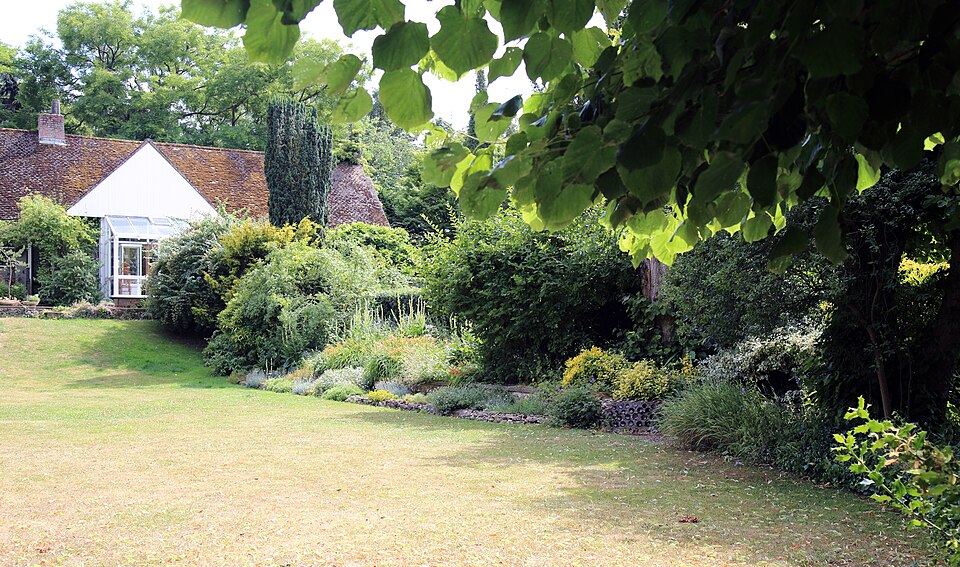
ILLUSTRATIVE PICTURE REPORTLandscaping / turfExample report · Toggle details

Brown, sparse areas interrupt an otherwise green lawn.

Location context
Fictional landscape bed and lawn
Detailed observation
The illustrative planting image supports a tentative count and plant-type estimate, not a botanical or health diagnosis. Some plants may be partly hidden and camera perspective can distort size and condition.
What the assessor should look for
  • Confirm species and counts by bed or location.
  • Check dead growth, irrigation, soil, pest symptoms and maintenance records on site.
  • Compare the installed landscape plan and applicable maintenance requirements.
Recommendation
Create a location-based inventory with identification confidence. Separate routine trimming or irrigation adjustments from replacements that require approval. Have a qualified landscape reviewer confirm the cause of observed decline before specifying treatment, then set quantities and work limits for the maintenance crew.
Closeout
Update the inventory after work, photograph each treated bed and record replacements, irrigation changes and follow-up dates.
Field review required

Illustrative image and finding; not a live assessment or compliance result.

Landscape & tree vegetationFence posts, fabric & gatesRoadway lighting
YOUR DOCUMENTS. YOUR REQUIREMENTS.

Bring your checklist.
Check the visible work.

Upload customer directions, guidelines, standards or contract requirements as PDF or Excel files. TruInspector Ai uses the relevant requirements alongside your photos and recorded videos to support a focused assessment.

1. Attach your requirements

Choose your industry and assessment type on Evaluations. Upload up to three PDF or Excel (.xlsx or .xls) documents, up to 5 MB each. Available for every industry and sector.

2. Add the evidence

Identify the site, location and relevant area. Add photos or recorded video, select the assessment type, and attach your requirements for any specific priorities.

3. Review a traceable report

Relevant findings identify the customer document and available page, section or worksheet reference, explain the visible concern, and list corrective actions and missing field checks. Download the report as PDF or Excel.

Upload your requirements on Evaluations

Customer requirements are identified separately from official regulations. Confirm the applicable edition and scope; an upload does not establish legal applicability or certify compliance. Attachments stay within your signed-in workspace and are not included in public picture links.

Document-reading limits

Excel review uses up to the first 1,000 rows per worksheet and may summarize the content; embedded pictures and charts are not read. Export important diagrams and longer requirements sections as PDF. Use clear, unlocked documents and check source references in the report. Unreadable content, missing measurements, concealed conditions and requirements outside the evidence remain unverified. This is an assisted visual review, not a complete contract audit.

INDUSTRY-SPECIFIC REPORT EXAMPLES

See the observation.
Know what to verify.

These examples match this industry or specialty workflow. Each includes a detailed preliminary observation, inspector checks, recommended work and a closeout record. Use the arrow to hide or show the details.
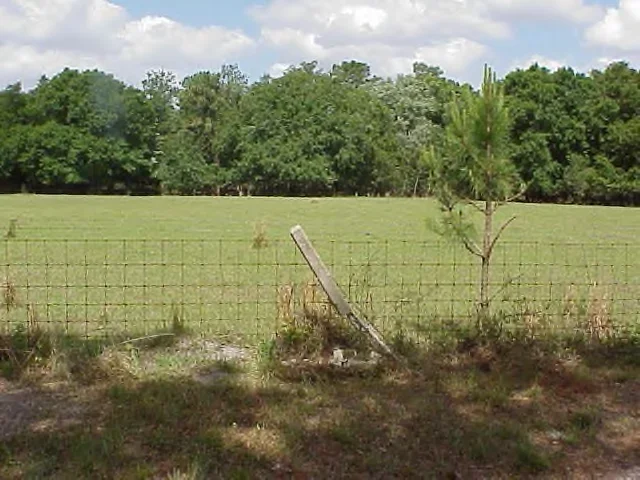
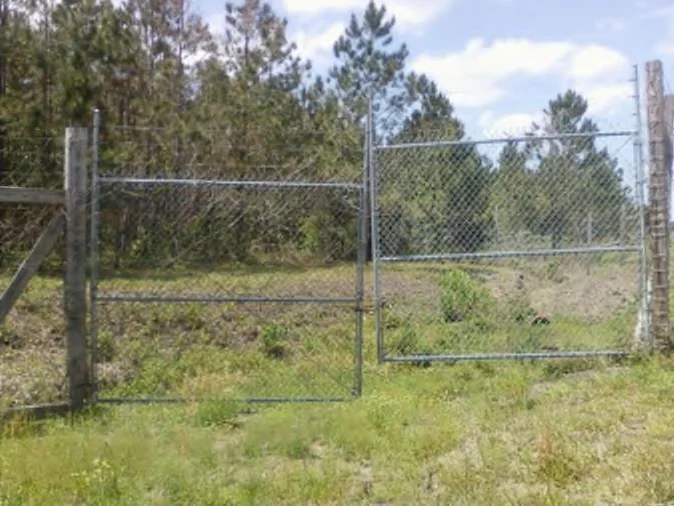
Fence / gates illustrative reference photo 1Fence / gates illustrative reference photo 2Fence / gatesBent or damaged fence posts and gaps between gates.Read picture report
Fence / gatesIllustrative item image · Preliminary example

Detailed observation

The example depicts bent fence posts and a possible gap at a gate. The view identifies an apparent opening but cannot establish its measured width, whether the gate latches or the full extent of damaged fabric and posts.

What the inspector should look for

  • Count consecutive damaged or missing posts and trace the fence line.
  • Measure the gate gap and test alignment, latch and closure on site.
  • Check the property boundary, access purpose and applicable contract criteria.

Recommendation and work plan

Secure an opening that presents a verified access concern while the repair is planned. Replace or straighten damaged components as appropriate, restore tension and attachment of fabric, and adjust the gate so it closes and latches under normal operation. Use the approved fence and gate details for materials and dimensions.

Closeout documentation

Test the gate, document the repaired posts and continuous fence line, and record measured clearances and materials.

Applicable requirement: Fence; also checks torn fabric and missing posts. An illustrative image does not establish a field measurement or compliance result.

Landscaping / turfLikely live oak (1), cabbage palms (2) and ixora shrubs in the example imagery.Read picture report
Landscaping / turfIllustrative item image · Preliminary example

Detailed observation

The illustrative planting image supports a tentative count and plant-type estimate, not a botanical or health diagnosis. Some plants may be partly hidden and camera perspective can distort size and condition.

What the inspector should look for

  • Confirm species and counts by bed or location.
  • Check dead growth, irrigation, soil, pest symptoms and maintenance records on site.
  • Compare the installed landscape plan and applicable maintenance requirements.

Recommendation and work plan

Create a location-based inventory with identification confidence. Separate routine trimming or irrigation adjustments from replacements that require approval. Have a qualified landscape reviewer confirm the cause of observed decline before specifying treatment, then set quantities and work limits for the maintenance crew.

Closeout documentation

Update the inventory after work, photograph each treated bed and record replacements, irrigation changes and follow-up dates.

Applicable requirement: Landscaping / Turf; species confidence needs review. An illustrative image does not establish a field measurement or compliance result.
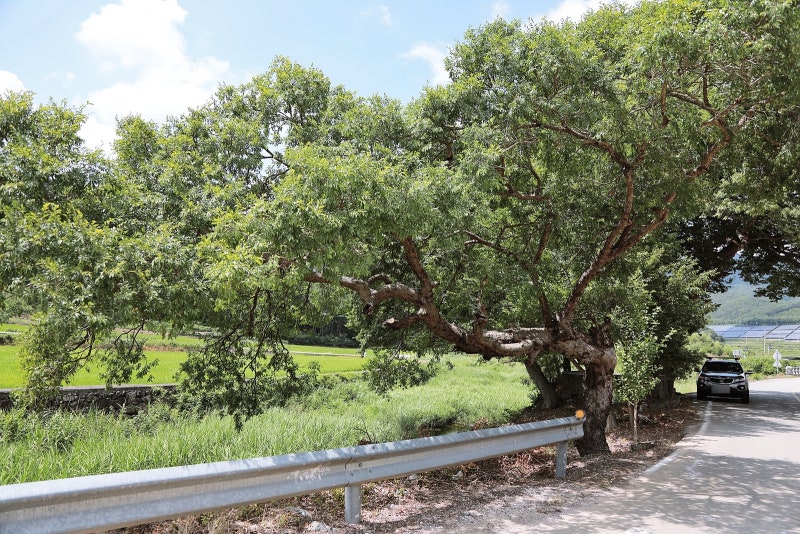
Tree trimming / vegetation illustrative reference photoTree trimming / vegetationTrees or limbs obscuring signs or encroaching on the roadway.Read picture report
Tree trimming / vegetationIllustrative item image · Preliminary example

Detailed observation

A tree limb appears to extend toward a sign or roadside asset in the illustration. The image cannot establish measured clearance, tree condition, right-of-way limits or safe pruning method.

What the inspector should look for

  • Measure vertical and lateral clearances from the affected asset or travel path.
  • Inspect the limb, tree condition and approach sight line on site.
  • Confirm ownership, permits, utility proximity and applicable vegetation criteria.

Recommendation and work plan

Arrange qualified pruning within the verified work limits, protecting traffic and nearby utilities as required. Remove only the growth needed to restore the approved visibility or clearance while preserving tree health. Escalate instability or utility conflicts to the appropriate specialist rather than inferring them from a photo.

Closeout documentation

Photograph the cleared approach, record measured clearance and pruning limits, and schedule follow-up where regrowth is likely.

Applicable requirement: Tree Trimming. An illustrative image does not establish a field measurement or compliance result.

Roadway lightingApparent outages and visible missing hardware.Read picture report
Roadway lightingIllustrative item image · Preliminary example

Detailed observation

The image can show a missing cover, damaged pole or apparent fixture issue; daytime photographs cannot establish whether a luminaire operates at night. Electrical circuit condition is not visible.

What the inspector should look for

  • Record pole or fixture identification and location.
  • Verify operation after dark and inspect visible covers, fasteners and pole condition.
  • Refer electrical access, isolation and testing to qualified personnel.

Recommendation and work plan

Create a work order for confirmed outage or missing hardware, including fixture ID and evidence. Have an authorized electrical crew test and repair the correct component under approved safety procedures. Replace covers or hardware with compatible parts and check adjacent units if the fault appears shared.

Closeout documentation

Document the repair, tested operation and nighttime result with photos and service records.

Applicable requirement: Lighting; day checks cover poles, covers and hardware. An illustrative image does not establish a field measurement or compliance result.

All images and findings are illustrative. They show report structure and inspection topics, not actual field evidence or a compliance decision.

SEE THE REPORTS

From field photos to PDF & Excel reports.

Detailed observations, location fields, practical recommendations and a standards assessment for every finding. Download your assessments as PDF reports with photos or Excel workbooks with picture links. Explore the three-row Excel examples below.

Landscaping

Excel
View 3 example findings
Landscaping: three observations from the linked example pictures
Location / sample GPSPotential findingRecommended next step
Site C example · Foreground lawn30.332200
-81.655700
Landscaping / turf illustrative item
Pale, browned turf across the foregroundThe foreground turf is yellow-brown while the lawn farther left is greener.
Check species, moisture and irrigation and distinguish dormancy from damage.Picture
Site C example · Right planting border30.332300
-81.655600
Landscaping / turf illustrative item
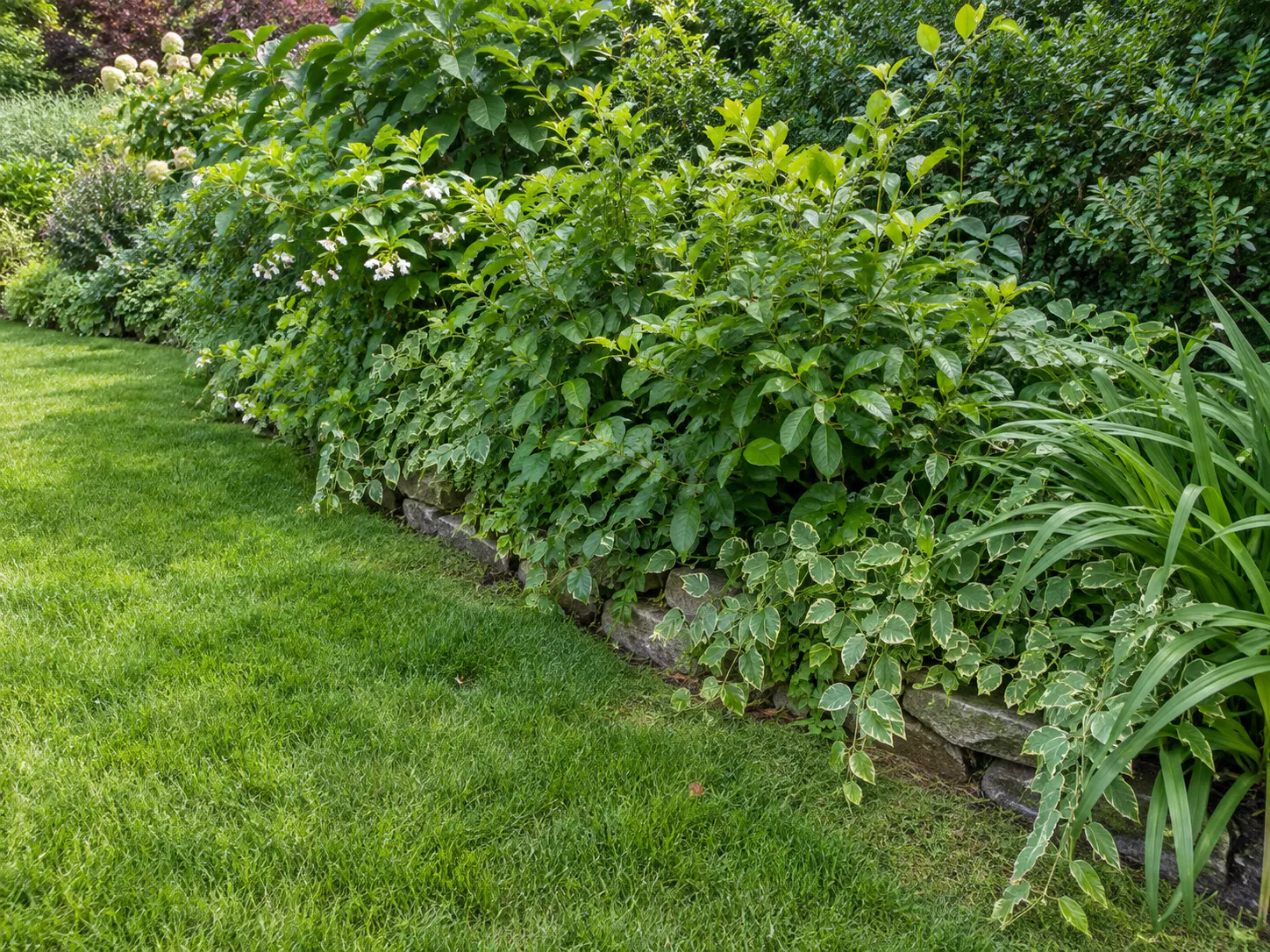
Plant growth obscures sections of the bed edgeFoliage covers sections of the stone bed edge; confirm whether the spread exceeds the intended planting line.
Compare with the planting plan and selectively shape only confirmed excess growth.Picture
Site C example · Roadside tree30.332400
-81.655500
Tree trimming / vegetation illustrative item
Large tree limb extends across the roadside vergeA large horizontal limb and hanging foliage sit close to the roadside access area.
Measure clearance and have an arborist define appropriate pruning work.Picture
Explore full findings, recommendations & standards
Landscaping / turf illustrative item

Pale, browned turf across the foreground

Site C example · Foreground lawn · Illustrative location; see the picture for the observation area
Sample GPS: 30.332200, -81.655700

What the picture shows
The foreground lawn is pale yellow-brown and noticeably less green than the grass farther back on the left. The difference in turf color extends across a broad area near the planting border.
Detailed finding
A broad area of foreground turf is pale and brown compared with greener lawn near the planting border and left background. The color change is visible, but the plants in the border remain predominantly green. Turf stress or seasonal dormancy are possible explanations; the picture cannot distinguish them or prove dead grass. Species, soil moisture, weather history, irrigation coverage and root condition need field verification before treatment.
What the inspector should look for
  1. Compare the foreground turf with the greener lawn.
  2. Check species, moisture, weather and irrigation coverage.
  3. Confirm dormancy or damage before prescribing treatment.
Recommended action
1. Map the discolored area and identify the turf species and recent weather and maintenance history. 2. Compare soil moisture and irrigation coverage in the pale and greener areas without assuming a watering fault. 3. Have the landscape lead check whether the turf is dormant, stressed or damaged and seek qualified diagnosis where needed. 4. Apply only the corrective treatment supported by that diagnosis and local water-use requirements. 5. Record observations and repeat photographs from the same position to assess recovery before deciding on replacement.
Closeout documentation
Retain the diagnosis, affected area, corrective action and matching follow-up photos documenting recovery or verified replacement needs.
Standards assessment
Not determined — field verification required

UF/IFAS notes that turf can brown during drought and later recover. Color alone does not establish dead grass or a contract failure. Compare verified turf condition with the project’s maintenance requirements.

Reference
UF/IFAS Lawn Management During Drought; landscape contract
Landscaping / turf illustrative item

Plant growth obscures sections of the bed edge

Site C example · Right planting border · Illustrative location; see the picture for the observation area
Sample GPS: 30.332300, -81.655600

What the picture shows
Dense foliage extends over portions of the stone-edged planting border on the right. The border line is partly concealed where the plants meet the lawn.
Detailed finding
The right-hand planting bed has a dense, irregular edge, with foliage covering sections of the low stone border and extending toward the lawn. This is a visible maintenance-review point if the approved design requires a defined bed boundary or clearance. It may also be an intentional planting form. The photograph does not show bare mulch patches, missing plants or an established access obstruction.
What the inspector should look for
  1. Locate concealed sections of the stone bed boundary.
  2. Compare plant spread with the approved design.
  3. Identify plants and suitable pruning limits before work.
Recommended action
1. Compare the planted edge with the approved landscape design and required bed limits. 2. Identify which plants extend beyond the intended boundary and check their condition and suitable pruning season. 3. If the growth conflicts with the specification, have the landscape lead select limited shaping consistent with plant health. Avoid removing growth solely to match an assumed outline. 4. Retain the intended planting coverage and check the border after work. 5. Record the approved scope and matching photographs showing the restored boundary.
Closeout documentation
Record the approved shaping scope and matching before-and-after photographs of the bed boundary. Note retained plants and follow-up checks.
Standards assessment
Not determined — field verification required

UF/IFAS describes selective shrub pruning to maintain desired form. The project’s planting plan determines whether this spread needs correction; the image does not establish noncompliance.

Reference
UF/IFAS Pruning Shrubs and Hedges; approved landscape plan
Tree trimming / vegetation illustrative item

Large tree limb extends across the roadside verge

Site C example · Roadside tree · Illustrative location; see the picture for the observation area
Sample GPS: 30.332400, -81.655500

What the picture shows
A thick, low limb extends horizontally from the roadside tree over the grassy verge. Foliage also hangs toward the narrow road beside the trunk.
Detailed finding
The linked tree photo shows a substantial horizontal limb extending left across the verge, while the trunk and canopy stand close to the road on the right. Hanging foliage narrows the visible envelope near the roadway. The photograph supports a clearance review but does not prove that the limb blocks vehicles or that the tree is unstable. Required vehicle clearance, measured branch height, ownership, utility proximity and tree condition remain unverified.
What the inspector should look for
  1. Measure the limb and foliage clearance from the actual road or access envelope.
  2. Confirm ownership, utility proximity and required vehicle clearance.
  3. Have a qualified arborist assess the limb before selecting pruning.
Recommended action
Measure clearance and confirm the facility's required access envelope. Have a qualified arborist assess the branch and select pruning consistent with tree health and permit requirements. Control access where contact is possible and coordinate utility involvement when relevant. After work, retain measured clearance, matched photographs and the approved pruning scope in the project record.
Closeout documentation
Record measured clearance, the approved arborist scope and matching photographs. Retain any follow-up tree-health review.
Standards assessment
Not determined — field verification required

UF/IFAS tree-care guidance supports selective pruning for clearance and appropriate arborist involvement. It does not establish a universal facility-access height. Obtain the local or project requirement, measure the route and confirm permissions. Document that comparison before deciding whether the condition meets the requirement.

Reference
UF/IFAS Pruning and Maintaining Trees; facility clearance requirement needed

Each finding links to its own illustrative picture, including Ai-generated demonstration scenes. Descriptions identify visible conditions; location labels and GPS are fictional examples. Field verification is required before deciding compliance or corrective work.

WHAT YOUR TEAM CAN DO

A practical path from photo to report.

Connect the condition, supporting evidence and next action without losing the context.

01

Landscape and vegetation

Review likely plant types and visible condition; document limbs obscuring a sign.

02

Fence and gate condition

Keep images of damaged posts, torn fabric or gate gaps with the recommended next step.

03

Lighting observations

Record apparent outages or visible missing hardware, then confirm them with suitable field checks.

KNOW WHAT THE RECORD SHOWS

Clear evidence. Considered decisions.

Plant identification and counts are estimates for review. Lighting photos cannot verify electrical safety, circuit condition or measured illumination.

Review applicable sources
FREE PRACTICAL RESOURCES

Landscaping, Fencing & Lighting
checklists and templates.

Use printable checklists, report examples and documentation guides built around this workflow.

View all 10 resources
INSPECTION REPORTING

Landscaping, Fencing & Lighting reports

Turn photos and recorded video into a reviewable condition record. Keep visible findings, evidence, recommended actions and follow-up together.

PDF reports with photos

Share observations and supporting pictures in a report your team can review.

Photo-linked Excel workbooks

Keep category, condition, description and action notes organized. Include location and GPS when supported by the evidence.

Category reports and follow-up

Classify mixed photos, review separate asset reports and track work status in the Data Hub.

Review Landscaping, Fencing & Lighting report examples
YOUR NEXT STEP

Put the evidence to work.

Explore the plans