Property Management
Move-in and move-out condition, routine maintenance, common areas and repair follow-up for apartments, HOAs, condos and rental portfolios.
Start property assessmentFollow one clear workflow. Each short demonstration uses different imagery and examples selected for this industry.
Document property conditions, damage and repair progress with photo-linked reports. Upload your directions, guidelines, standards or contract requirements as PDF or Excel files so Ai can check visible conditions against your documents.
Illustrative image and finding; not a live assessment or compliance result.
Move-in and move-out condition, routine maintenance, common areas and repair follow-up for apartments, HOAs, condos and rental portfolios.
Start property assessmentWater, fire and storm damage documentation, affected rooms and materials, restoration progress and completion review.
Start restoration assessmentUpload customer directions, guidelines, standards or contract requirements as PDF or Excel files. TruInspector Ai uses the relevant requirements alongside your photos and recorded videos to support a focused assessment.
Choose your industry and assessment type on Evaluations. Upload up to three PDF or Excel (.xlsx or .xls) documents, up to 5 MB each. Available for every industry and sector.
Identify the property and unit, room or common area. Add photos or recorded video, select the assessment type, and attach your requirements for any specific priorities.
Relevant findings identify the customer document and available page, section or worksheet reference, explain the visible concern, and list corrective actions and missing field checks. Download the report as PDF or Excel.
Customer requirements are identified separately from official regulations. Confirm the applicable edition and scope; an upload does not establish legal applicability or certify compliance. Attachments stay within your signed-in workspace and are not included in public picture links.
Excel review uses up to the first 1,000 rows per worksheet and may summarize the content; embedded pictures and charts are not read. Export important diagrams and longer requirements sections as PDF. Use clear, unlocked documents and check source references in the report. Unreadable content, missing measurements, concealed conditions and requirements outside the evidence remain unverified. This is an assisted visual review, not a complete contract audit.
These examples match this industry or specialty workflow. Each includes a detailed preliminary observation, inspector checks, recommended work and a closeout record. Use the arrow to hide or show the details.
The example under-sink assembly shows supply shutoffs and a drain trap. A photo can record visible staining or connection condition, but cannot prove the absence of a slow leak or the performance of concealed piping.
Describe the exact fixture and visible issue, then request a licensed plumbing review for confirmed leakage or an unsafe or defective connection. Recommend repair of the verified component and investigation of adjacent concealed damage where staining warrants it. Distinguish observed moisture from a suspected source.
Record fixture operation and any follow-up repair documentation with before-and-after images.
Applicable requirement: Confirm the state rules or locally adopted code before applying a criterion. An illustrative image does not establish a field measurement or compliance result.
The example shows an outdoor cooling unit and associated duct connection. Exterior imagery does not establish equipment capacity, refrigerant condition, airflow, operating temperature or internal safety controls.
Describe any visible damage or operational concern and recommend service by a qualified HVAC contractor where the observed condition warrants it. Ask the contractor to diagnose performance and address confirmed drainage or equipment issues. Keep any age or remaining-life statement grounded in verified data.
Document the operating test and limitations, then attach service results when available.
Applicable requirement: Confirm the state rules or locally adopted code before applying a criterion. An illustrative image does not establish a field measurement or compliance result.
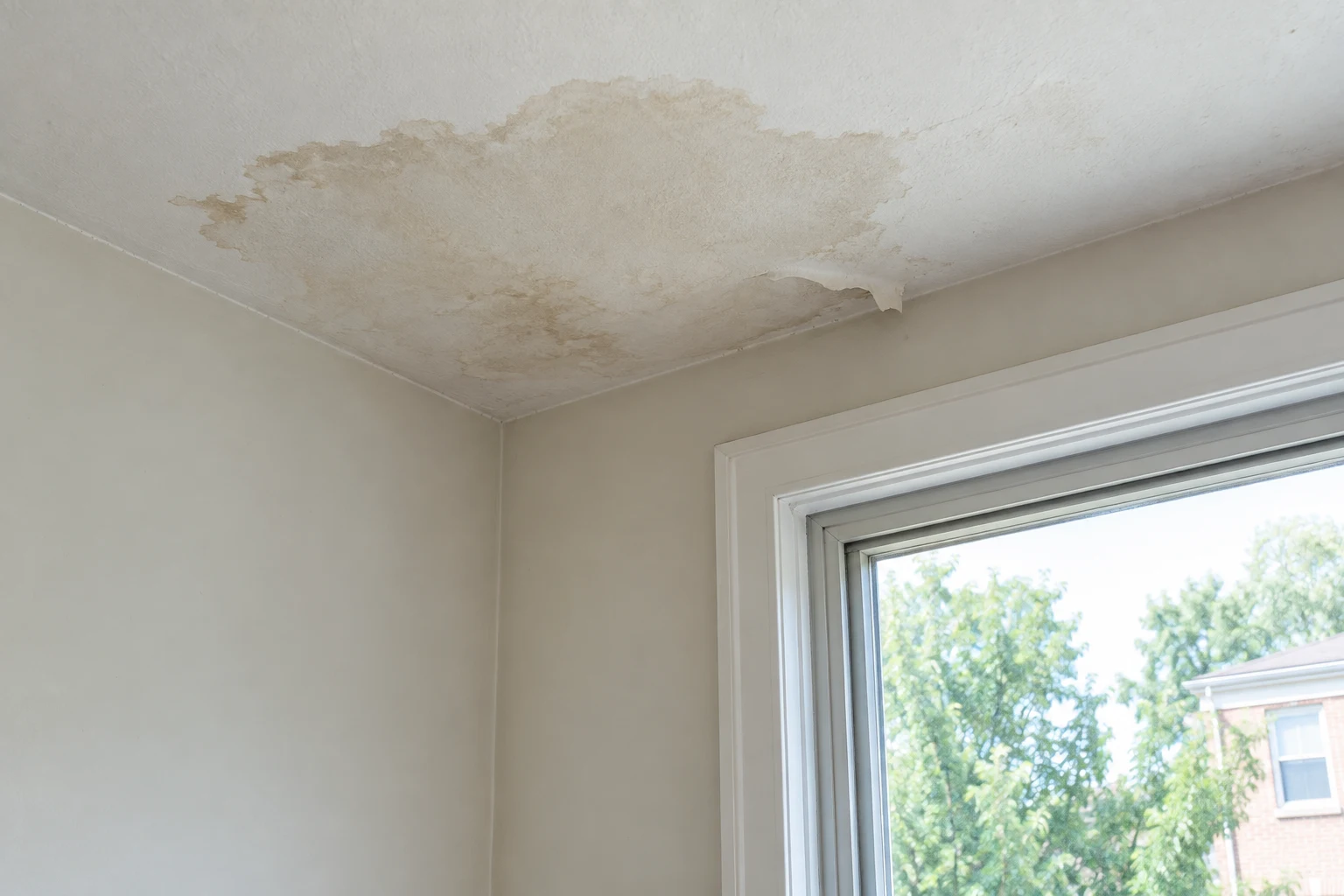 Property / restoration — ceiling conditionA broad tan ceiling stain and peeling finish are visible above a window.Read picture report
The illustrative photo shows an irregular tan stain spreading across the ceiling near a window, with a small section of peeling finish at the ceiling edge. The discolored area has uneven boundaries. These visible finish changes warrant a source and material-condition check, but the image does not establish whether moisture is active, what caused the staining, or whether concealed components are affected.
Protect the area as warranted by the site assessment and have the responsible team determine the source before cosmetic work. Select the repair scope from actual moisture and material-condition checks. Once the source and required drying or other corrective work are verified, prepare and restore the affected finish with compatible products appropriate to the substrate and project requirements. Do not simply conceal an unresolved stain or presume a chemical treatment is needed.
Keep the original view, actual field readings and source-repair record, then add a matching completion photo and qualified follow-up. A clean-looking finish alone does not verify concealed drying or clearance.
Applicable requirement: Check applicable local property requirements and any supplied maintenance or restoration criteria; the image does not establish a cause or measured moisture. An illustrative image does not establish a field measurement or compliance result.
All images and findings are illustrative. They show report structure and inspection topics, not actual field evidence or a compliance decision.
Connect the condition, supporting evidence and next action without losing the context.
Use Property Management for routine condition rounds and unit turnovers, or Damage & Restoration for water, fire and storm documentation.
Attach PDF or Excel guidelines, checklists, standards or contract requirements. Ai compares relevant document criteria with visible photo and video evidence and identifies the source in the report.
Save the property, unit or room, findings and evidence to the Data Hub. Update corrective-work status and keep later assessments under the same location identifiers.
Visual assessment supports property and restoration reporting. Confirm local requirements, document applicability and any measurements. Images do not establish habitability, hidden damage, mold species, structural safety or insurance coverage.
Review applicable sourcesUse printable checklists, report examples and documentation guides built around this workflow.
Turn photos and recorded video into a reviewable condition record. Keep visible findings, evidence, recommended actions and follow-up together.
Share observations and supporting pictures in a report your team can review.
Keep category, condition, description and action notes organized. Include location and GPS when supported by the evidence.
Classify mixed photos, review separate asset reports and track work status in the Data Hub.