1. Attach your requirements
Choose your industry and assessment type on Evaluations. Upload up to three PDF or Excel (.xlsx or .xls) documents, up to 5 MB each. Available for every industry and sector.
Support Vision Zero teams with organized evidence of visible roadway markings, signs, symbols and delineators.

Upload customer directions, guidelines, standards or contract requirements as PDF or Excel files. TruInspector Ai uses the relevant requirements alongside your photos and recorded videos to support a focused assessment.
Choose your industry and assessment type on Evaluations. Upload up to three PDF or Excel (.xlsx or .xls) documents, up to 5 MB each. Available for every industry and sector.
Identify the site, location and relevant area. Add photos or recorded video, select the assessment type, and attach your requirements for any specific priorities.
Relevant findings identify the customer document and available page, section or worksheet reference, explain the visible concern, and list corrective actions and missing field checks. Download the report as PDF or Excel.
Customer requirements are identified separately from official regulations. Confirm the applicable edition and scope; an upload does not establish legal applicability or certify compliance. Attachments stay within your signed-in workspace and are not included in public picture links.
Excel review uses up to the first 1,000 rows per worksheet and may summarize the content; embedded pictures and charts are not read. Export important diagrams and longer requirements sections as PDF. Use clear, unlocked documents and check source references in the report. Unreadable content, missing measurements, concealed conditions and requirements outside the evidence remain unverified. This is an assisted visual review, not a complete contract audit.
These examples match this industry or specialty workflow. Each includes a detailed preliminary observation, inspector checks, recommended work and a closeout record. Use the arrow to hide or show the details.
The sample image suggests a connected pattern of cracking within the travel surface, with some broken edges and loose aggregate. The visible pattern can identify an area for review but does not show crack width, depth, movement, subsurface condition or the full affected area. A single image cannot establish the maintenance rating for an entire segment.
Mark and photograph the affected limits under the required traffic control. Have the pavement team determine whether sealing, localized patching or a more extensive repair fits the verified condition. Address drainage or failed material where field evidence supports it. Record the chosen treatment, quantities and responsible reviewer before scheduling work.
Photograph the repaired surface from matching viewpoints, record dimensions and materials, and have the responsible team verify the finished ride and surface continuity.
Applicable requirement: Field review required to confirm pavement condition and repair needs. An illustrative image does not establish a field measurement or compliance result.
Part of a lane line appears worn or interrupted in the demonstration image. Lighting, camera exposure and the viewing angle affect appearance, so the image does not establish measured retroreflectivity, nighttime function or the total missing length.
Verify the approved layout and remove conflicting remnants if required. Restore the correct color, width, pattern and material under the applicable traffic-control and material specifications. Sequence the work to keep the lane safely controlled, and avoid changing the layout based on the image alone.
Capture daytime and appropriate nighttime views, check the installed pattern and record quantities and material information.
Applicable requirement: Striping; confirm nighttime function. An illustrative image does not establish a field measurement or compliance result.
A pavement symbol appears partly faded in the example. The visible gap may reduce legibility, but a still image cannot establish the approved lane-use designation, required dimensions or nighttime performance.
Confirm the intended movement before repainting. Prepare the surface, remove incompatible old markings if needed and restore the approved shape and orientation with the specified material. Coordinate any lane closure and keep a record of the approved layout used for the repair.
Photograph the complete symbol from the approach, document measurements and verify that it agrees with the current plan.
Applicable requirement: Pavement Symbols. An illustrative image does not establish a field measurement or compliance result.
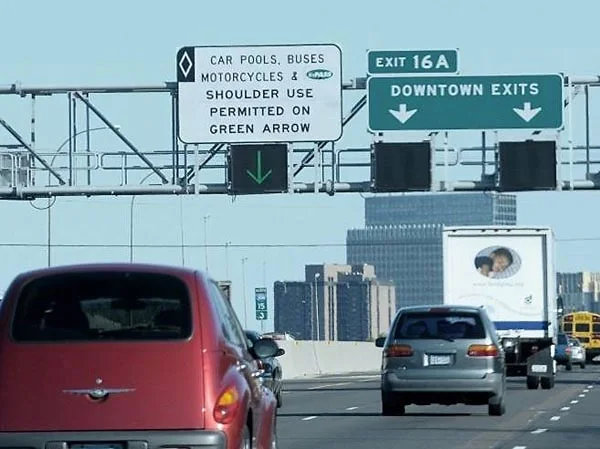 Signs / sign supportsNighttime reflectivity issues, damaged signs and exposed support bases.Read picture report
The illustrative sign may show face damage, obstruction or a visible support-base concern. A daylight picture alone cannot prove retroreflectivity, sign-legibility distance, mounting height or the structural condition of the support.
Prioritize a verified missing or unreadable traffic-control message with the responsible road authority. Replace or repair the face, hardware or support using approved details, and clear an obstruction if that is the cause. Coordinate traffic control and avoid assigning a reflectivity failure from daylight imagery alone.
Photograph the sign from the driver approach and close-up, document the installed designation and complete required nighttime or measurement checks.
Applicable requirement: Signs; apparent reflectivity needs nighttime verification. An illustrative image does not establish a field measurement or compliance result.
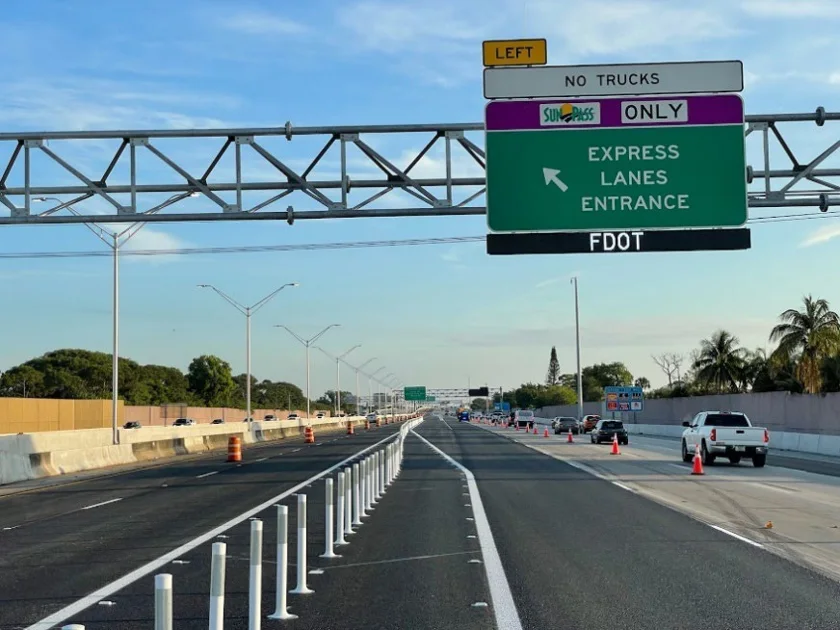 Object markers / delineatorsSuspected three consecutive missing delineators or large gaps.Read picture report
The illustrative express-lane view suggests a gap in delineators. It cannot prove that three consecutive devices are missing without confirming the intended plan, camera coverage and the continuous run.
After verifying the design, replace missing or displaced devices with the specified type and spacing. Correct damaged mounts or misalignment and coordinate work-zone access around the express lane. Record the start and end of the affected run and the replacement count.
Photograph the full restored sequence from the approach and document spacing and material used.
Applicable requirement: Gap alert: verify layout and applicable contract rules. An illustrative image does not establish a field measurement or compliance result.
The image can show a missing cover, damaged pole or apparent fixture issue; daytime photographs cannot establish whether a luminaire operates at night. Electrical circuit condition is not visible.
Create a work order for confirmed outage or missing hardware, including fixture ID and evidence. Have an authorized electrical crew test and repair the correct component under approved safety procedures. Replace covers or hardware with compatible parts and check adjacent units if the fault appears shared.
Document the repair, tested operation and nighttime result with photos and service records.
Applicable requirement: Lighting; day checks cover poles, covers and hardware. An illustrative image does not establish a field measurement or compliance result.
All images and findings are illustrative. They show report structure and inspection topics, not actual field evidence or a compliance decision.
Select the state, industry, asset or safety topic and work type. Review matched references and field checks alongside the photo or sampled video frame.
Record faded markings and obscured signs with route context.
Keep photo evidence and supported GPS with each finding.
Provide condition documentation for a broader safety-program review.
Condition records do not establish crash causation, predict crashes, certify a safe design or measure Vision Zero outcomes.
Source matches are preliminary. If a governing requirement is unavailable or outside the selected regulatory reference scope, the record remains unverified.
Discuss your requirementsTurn photos and recorded video into a reviewable condition record. Keep visible findings, evidence, recommended actions and follow-up together.
Share observations and supporting pictures in a report your team can review.
Keep category, condition, description and action notes organized. Include location and GPS when supported by the evidence.
Classify mixed photos, review separate asset reports and track work status in the Data Hub.